How Language Affects the Way Customers Find Your Business
A customer might be looking for exactly what you offer but still struggle to find your business online. This happens when your website uses different words than customers search for or when they search in another la...




A customer might be looking for exactly what you offer but still struggle to find your business online. This happens when your website uses different words than customers search for or when they search in another language.
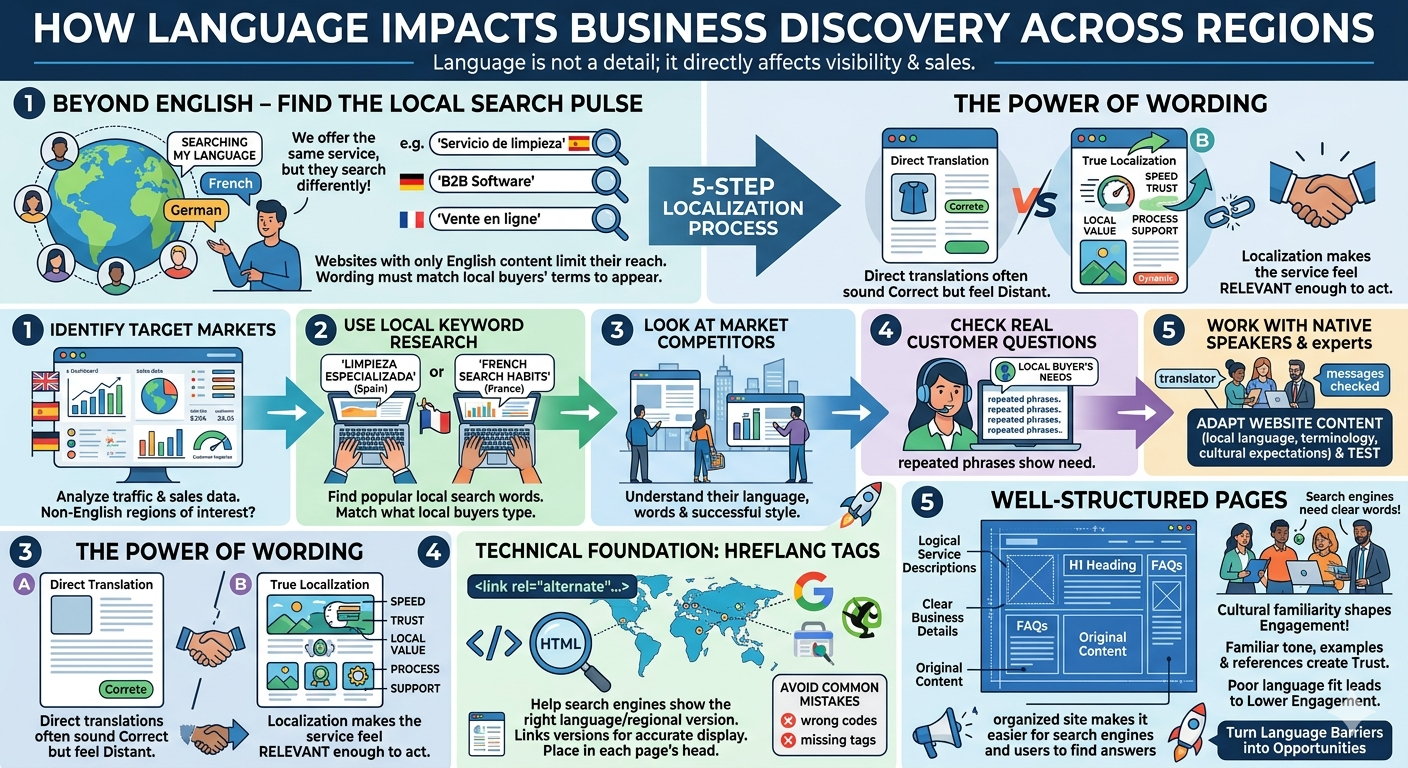
Imagine a cleaning company in Spain. An English page about “home cleaning” may explain the service clearly, but Spanish content helps the company reach people searching in Spanish. The same applies to a software provider targeting German businesses or a retailer selling to French customers. Does your website use the words buyers search for?
Google says its search systems try to match pages to the searcher’s language. An English-only website can still attract international visitors, but it may miss customers searching in other languages.
Once someone visits your site, can they understand what you offer, whether you serve their area, and what to do next? If visitors must translate service details, delivery terms, or the inquiry form, contacting you becomes harder.
Translation is useful, but choosing the right words matters too. Even if a sentence is correct, it may sound strange to your reader. A service name might not match the words customers use to search for it.
Even within English, someone might search for a “removal company” or a “moving company.” The service is the same, but the words differ. In other languages, a direct translation is often not the phrase people actually use in search engines. Learn how customers in the intended market describe what they need.
1. Pick a market you can serve. Check your inquiries, sales, and website visits for signs of interest. Then make sure your delivery, service area, and customer support fit that market's needs. Find out which words your customers use. Look into local search terms, including specific phrases for your products or services. Sometimes, a less common phrase is more relevant to your offer than a broad, popular one.
2. Read websites from local businesses. Notice how they name services, explain prices, and answer questions. This helps you learn common terms instead of copying competitors. Customer conversations, emails, inquiry forms, and support messages can reveal questions your website has not answered. They also show how customers describe their requirements in their own words.
3. Ask someone familiar with both the language and the industry to review your content. Have them check product names, technical terms, and the overall message. See whether the page sounds like something a local business would say.
Your goal is to create a page that helps people understand and evaluate your business. Swapping English words for dictionary translations is only part of the job.
For example, “fast delivery” does not tell buyers much. Instead, explain where you deliver, how long it usually takes to ship orders, and how customers can check availability. If you offer software, buyers might want to know which languages your support team speaks or whether training is included.
Make sure these details are accurate in every language version. Don’t let a translated page suggest you offer local support, delivery, or services that you cannot actually provide.
Set up your website so people can easily find different language versions. Google suggests using a separate URL for each language instead of relying on cookies or browser settings. It also recommends letting visitors choose their language with links instead of automatically redirecting them.
Your developer can add hreflang annotations to show which pages are meant for different languages or regions. This helps Google understand how the versions relate. These tags don't translate your content, and Google doesn't use them to determine a page’s language.
If you add hreflang through HTML, put the tags in the page’s head section. Each version should link to itself and to its matching versions, with links going both ways. Use the right language codes and add a region if needed. A translated service page should link to the same service page in other languages, not just to the homepage. Your developer can also set up these tags in a sitemap or with HTTP headers.
For business owners, the practical check is straightforward: can someone reach the right page, read it comfortably, and contact you without running into untranslated instructions?
Look at the entire customer journey. A translated product description will not help much if the inquiry form, error messages, or booking instructions are still confusing. Make sure you explain your service area, availability, and contact options wherever customers need them.
Ask someone in your target market to try a simple task on your website, like finding delivery details or requesting a quote. Notice where they pause or get stuck. Their questions can reveal unclear wording or missing details you may have missed. Look beyond visitor numbers. Track relevant inquiries, quotation requests, bookings, or sales from the market you are trying to reach. If a page receives visitors but few inquiries, examine the offer, pricing, service coverage, and contact process alongside the language.
Start with a market you can support and a few pages that matter to its customers. Improve them using actual questions and feedback. Expand only when you can maintain the same accuracy and service level across additional languages. Ultimately, focus on the pages, words, and support that help the right customers find you and act with confidence.